


An agent is worth exactly what it knows. The difference between a $950 bot and a machine that closes deals is not the model and not the prompt, it is access to your price list, stock and contract pricing. In 2026 there is finally a way to build that access once instead of once per model.
What breaks the result is starting with the bot. First the widget gets bought, then it turns out it cannot see prices, then an integration is built for it, and six months later the model changes and all of it is rewritten. None of that spend carries over.
The sentence that costs you the deal
Please check with a manager. Our specialist will be in touch. Leave a request and we will send the price list. Three ways of telling a buyer you do not have the answer until somebody comes to work.
In B2B this lands worse than it looks. Someone comparing three suppliers at ten in the evening is not waiting for the morning. They go with whoever answered in numbers.
The expensive part is that the agent looked like it worked. It answered fast, politely and on topic, just without the one thing the buyer came for.
- What the buyer wanted: a price, availability and a lead time. Three numbers.
- What they got: a promise that somebody will call at some point.
- What happened next: they got those three numbers in another chat, from a competitor.
Open your own site chat and ask for the price of your flagship item. The answer will tell you whether your agent sells or performs.
What an agent has to see to answer in numbers
The list is shorter than it looks and nearly identical in every business. Price, availability, specifications, customer history. You already hold all of it. It simply sits in different places and is not connected to whatever is talking to the buyer.
The price list lives in an ERP, say Odoo. Stock sits across warehouses and updates overnight. Specifications live separately, because the manufacturer supplies them. Customer history sits in the CRM. An agent wired only to the website sees none of it.
- Price: the public list price and the contract price for that specific customer. Two different permissions, and confusing them is expensive.
- Availability: stock level. It goes stale fastest, which is why an invented answer here costs the most.
- Specifications: power, voltage, cycle life, protection rating. The things buyers actually compare.
- Customer history: what they bought and asked before. It turns an answer into a conversation.
Write those four lines on paper and note where each one lives today. That is your scope of work.
Why this is still expensive: one connector per pair
The classic way to join one thing to another is a separate integration per pair. Site widget to ERP. Widget to stock. Messenger to ERP. Manager assistant to CRM. Four systems and three channels give twelve connections, each with its own code, its own permissions and its own way to break.
Then the unpleasant part happens. You switch models because a better and cheaper one shipped, and some of those connections have to be rewritten. Last year's budget does not transfer.
This is why AI adoption looks expensive. The model is not the cost. The connector matrix is, and it grows faster than the number of systems.
- Three channels and four systems: is twelve connections, not seven.
- Changing the model: means rewriting part of the matrix and paying for the same work twice.
- Who maintains it: a different person for each pair. That is the real ceiling on scaling.
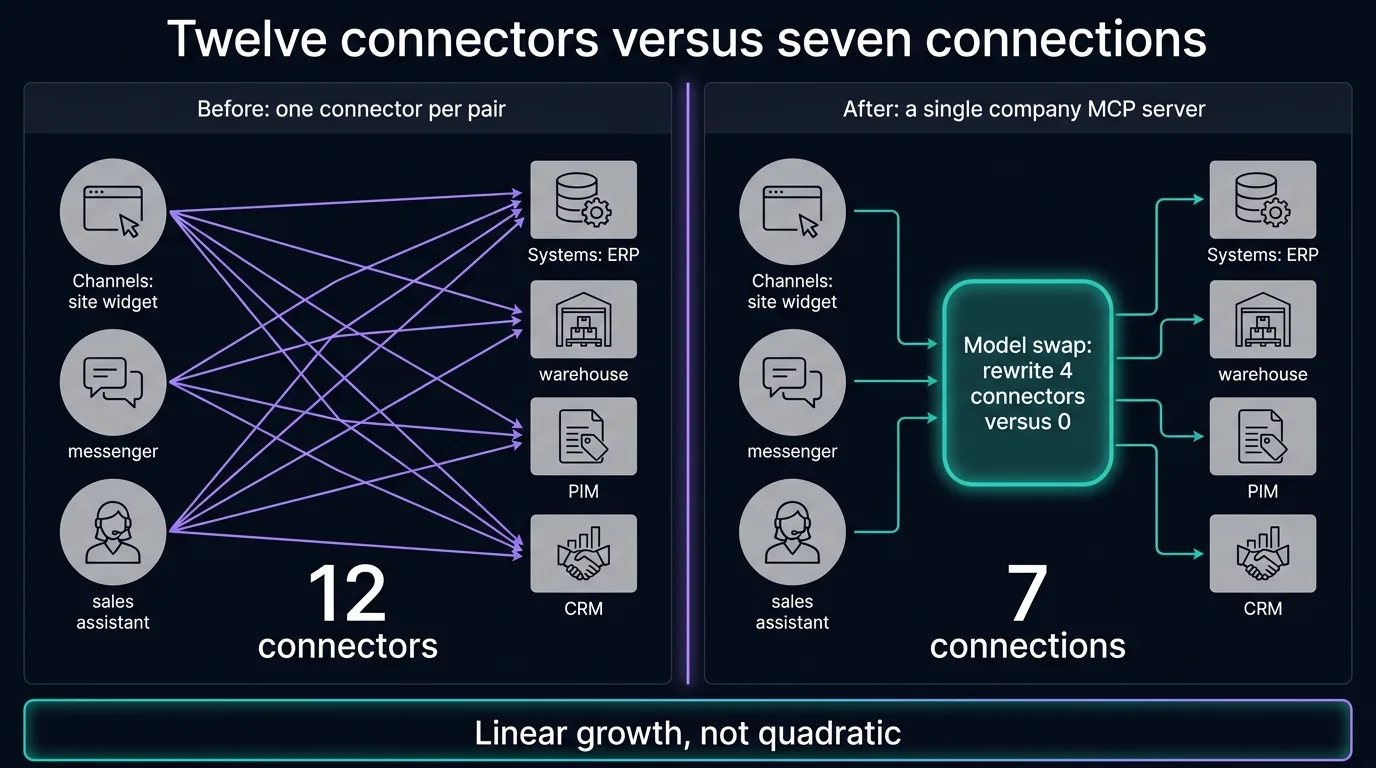
Count your systems and channels and multiply. That number is the debt you are paying off in instalments.
One access layer: what changed in 2026
In 2026 this problem got a standard. Instead of an integration per pair, the company stands up one access layer over its own data, and every model and channel comes to that layer. The technical name is MCP, and a mature revision of the specification landed in July 2026.
What matters to you is not the protocol but the arithmetic. Twelve connections become seven: four from systems into the layer and three from channels into it. Switching models stops being a project and becomes a connection.
The second change is subtler and worth more. The layer does not hand over a database, it hands over a list of permitted actions: show the public price, check stock, pull specifications. The model does not receive your data, it receives seven buttons.
- Before: an integration per pair, and paying again on every model change.
- After: one layer that every channel and model connects to, built once.
- What that is worth: a new model or a new channel connects in hours instead of weeks.
- Why it is not magic: the data still has to be pulled out of the ERP once. After that, never again.
If you plan more than one channel, or expect to change models at some point, treat this layer as mandatory rather than nice to have.
Enter your systems and channels and see what the connector matrix costs against one access layer. Your numbers, formula on screen.
Connector matrix
One MCP server
Who sees what, and why the agent cannot break anything
The first objection an owner raises is always the same: where does our data go. The right answer is not a promise but a construction. The agent gets no access to a database, it gets a list of actions, and every action carries its own condition.
Public pricing is visible to anyone. A contract price is visible only to the signed-in customer that contract belongs to. Stock refreshes by the minute and is not cached for long. Customer history and agreement text are not cached at all.
Anything that changes data requires human confirmation. The agent can prepare an invoice, not issue one. That is not caution, it is the condition under which such a system can face customers at all.
- Actions, not a database: a list of seven buttons instead of access to tables.
- Permissions by role: anonymous visitor, signed-in customer, manager, internal system. Four different pictures.
- Freshness over speed: stock and contract pricing are not cached, because yesterday's truth is worse here than no answer.
- Irreversible actions need a person: anything touching data or money is confirmed by a manager.
Put this permission matrix into the contract with your vendor before the work starts, not after the first incident.
Pick a data type and who is asking, and see what the agent should return and what it should not. This is the document worth putting in the contract.
How to sign off: the agent has no right to invent a price
You cannot accept an AI system by eye, because it answers slightly differently every time. So acceptance looks like a set of real customer questions the agent has to pass before launch.
The questions are not invented. Half come from actual conversations, some are edge cases, and some are deliberately outside the knowledge base, to test the thing that matters most: will the agent say it does not know instead of making something up.
One item in that sign-off is blocking. An invented price or specification is not a note, it is a refusal to accept. Everything else can be tuned after launch. This cannot.
- A set of real questions: one hundred to three hundred, depending on product groups and languages.
- A mandatory portion: questions outside the knowledge base. The correct answer there is an admission of not knowing.
- Blocking defect: an invented price, specification or stock figure. One such answer stops the launch.
- What stays with you: the question set itself. It is your control instrument for every release afterwards.
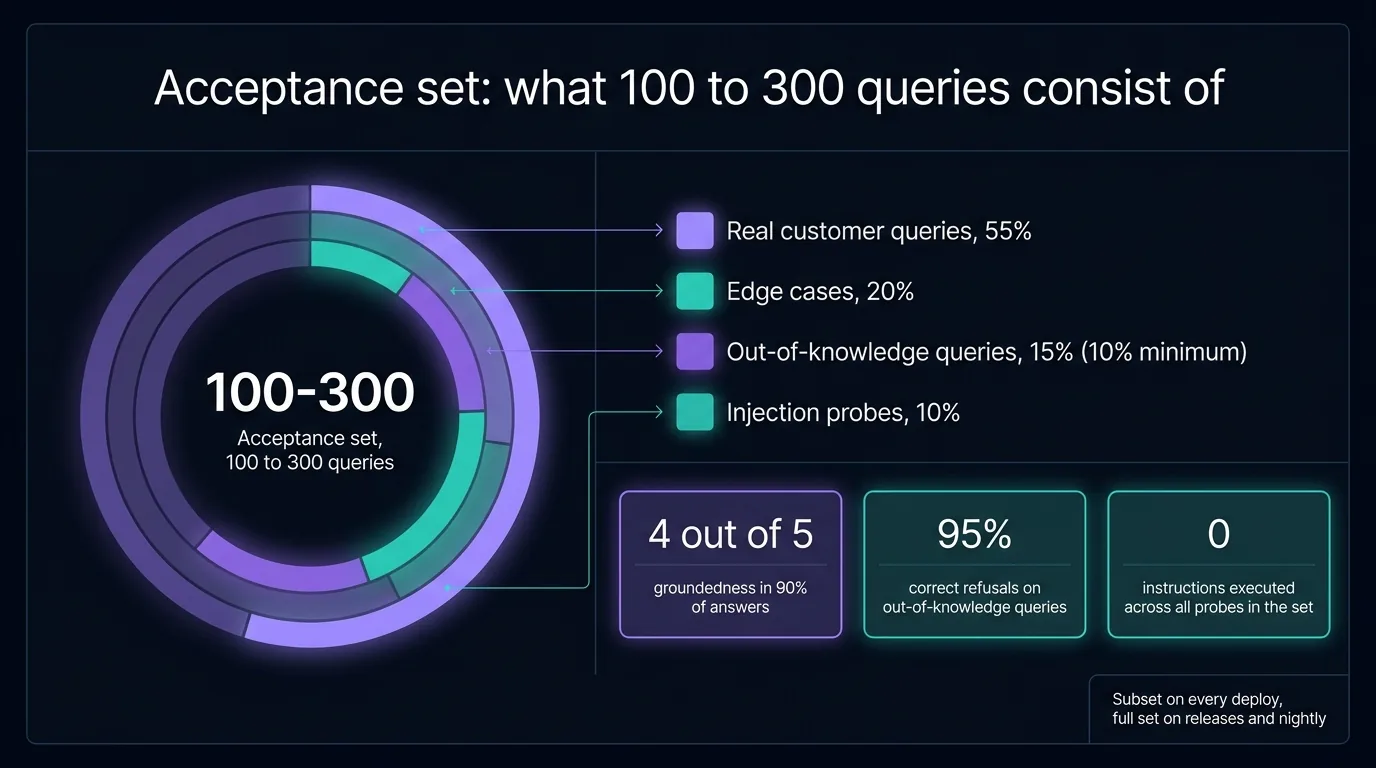
Ask your vendor to show you that set before work begins. Without it you will be signing off by eye.
So you are not signing off by eye. Enter product groups and languages and see the size of the acceptance set and what it consists of.
What it costs and where to start
You do not have to start with the access layer. Start with something you can verify this week and add as you see returns.
An AI agent for the website from $950 works on the open data of your site: it answers, qualifies and hands over the lead. The $1,950 tier adds qualification matched to your sales model and writes into the CRM. From $2,000 is Enterprise with RAG over your documents and price lists, for when the answer has to be exact.
The access layer into your systems is a separate integration project with its own estimate, because it depends on which ERP you run and what condition it is in. If the loop has to come together fast, that is a Pilot Sprint of 10 working days.
- Agent Start, from $950: answers on open site data, qualification, lead handover.
- Agent Business, $1900: qualification matched to your sales model, written into the CRM.
- Agent Enterprise, from $2,000: RAG over documents and price lists, for when the cost of error is high.
- Access layer into ERP and CRM: a separate project, estimated after an inventory of sources.
- Pilot Sprint: 10 working days with a working piece at the end.
The cheapest first step is free: open the demo agent built from your own site and you will see immediately what it is missing.
See what your agent can already answer today. The demo builds a knowledge base from your own site in a few minutes and starts answering with your facts. You see straight away where the knowledge ends and access to pricing or stock is needed.
Open the agent demo